

 Advanced Portal Reports for JSM
Bring self-service reporting and
prioritization to your JSM portal
Give customers full visibility into their requests: search,
filter, and export, all in one report view. When priorities
need to be set, the right people can set them right there.


JSM's portal shows a request.
It doesn't show the full picture.
Customers can see that a request exists, but not its SLA status,
custom fields, or the context needed
to make sense of it. Advanced
Portal Reports brings that visibility directly into the customer portal,
and
when priorities need to be set, business stakeholders can set
them right there, without a Jira license.
One report, everything you need
Self-service visibility for portal customers
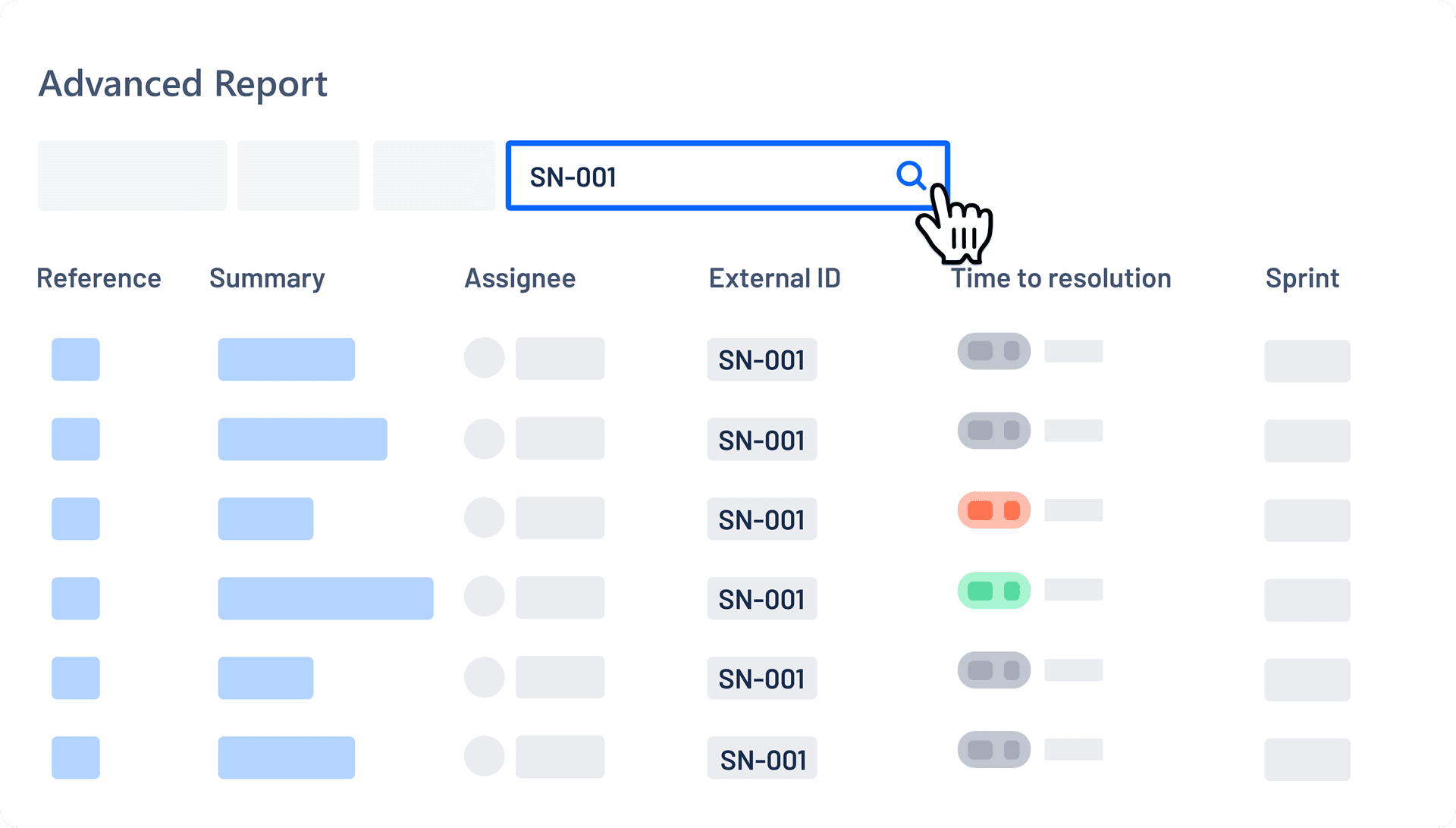
Customers no longer have to wait on agents for status updates. They can use full-text search to find requests, filter and export results, track request volume and SLA performance with built-in charts, and see full context, including custom fields, directly in the portal.
Save views once, reuse them every time
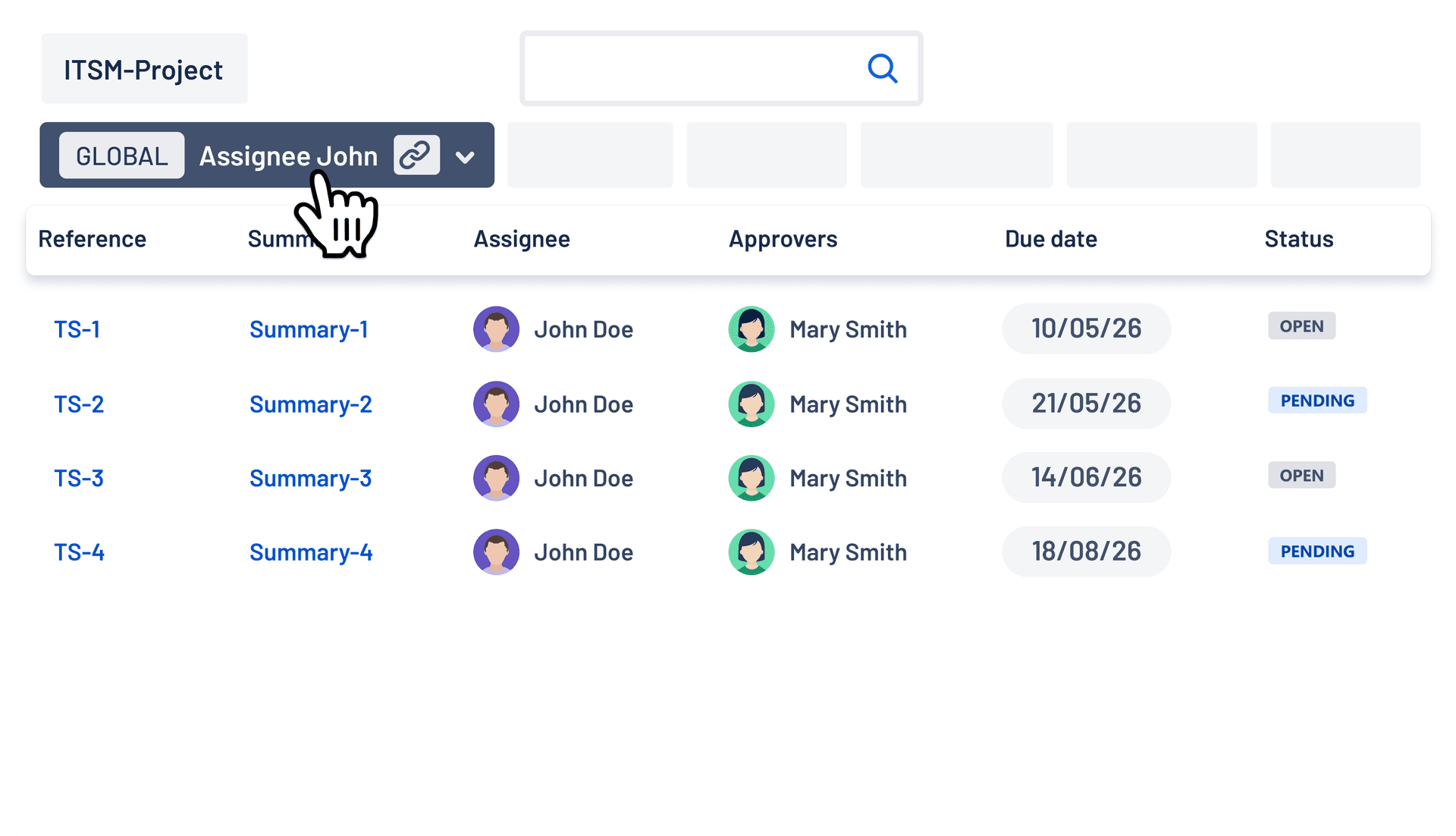
Customers can save their preferred filters and columns as personal views for quick access to the data they need. Admins can create Global Views with preconfigured filters and fields, then share them with a link so customers can easily find the right data and everyone stays on the same page.
Prioritize requests before planning begins
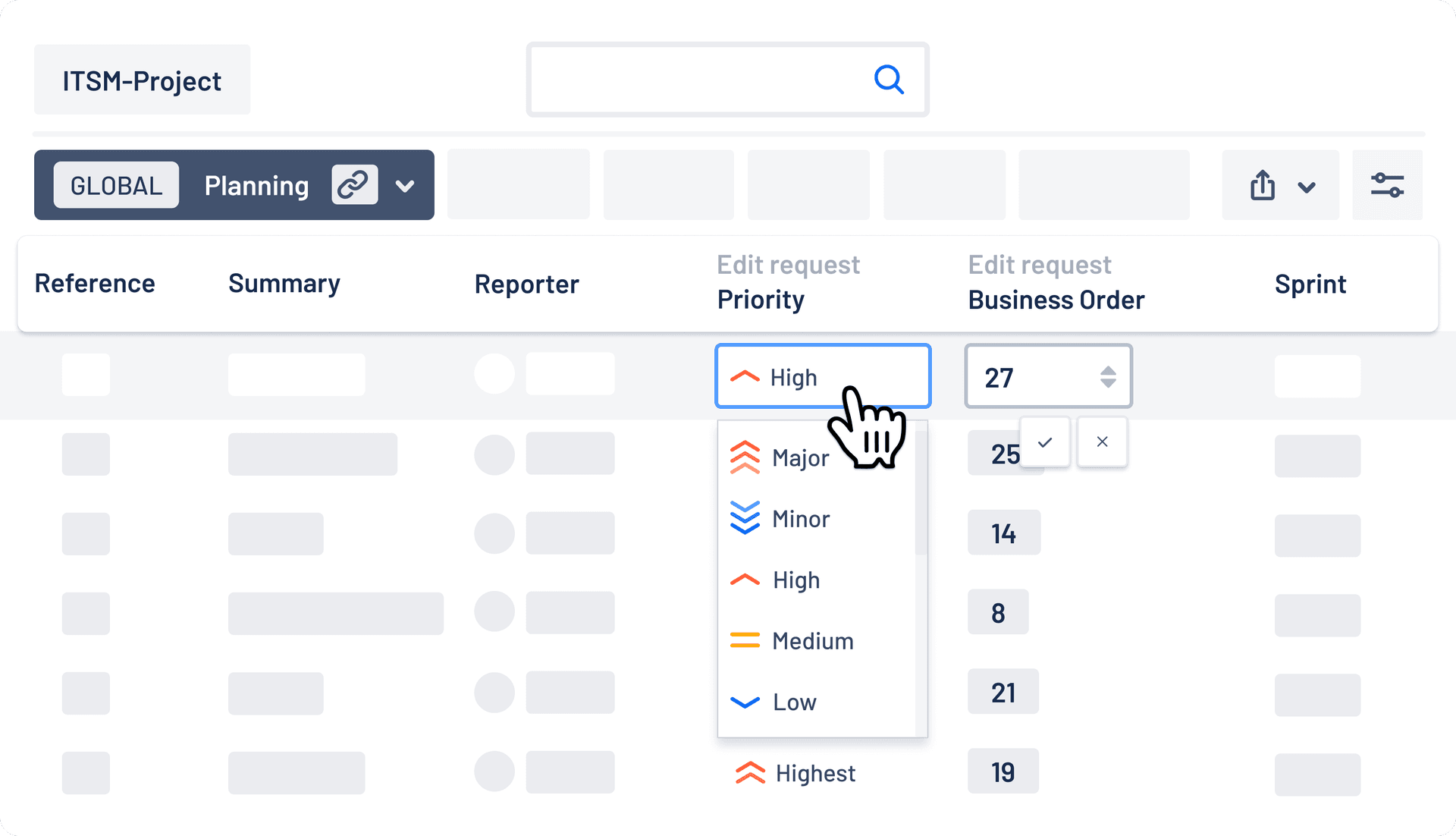
Before service reviews, business stakeholders can prioritize request lists by editing priority, custom number, single-select, and date fields directly in the report, with no more external spreadsheets, disconnected systems, or email chains to coordinate updates.
Control who edits what, and track every change
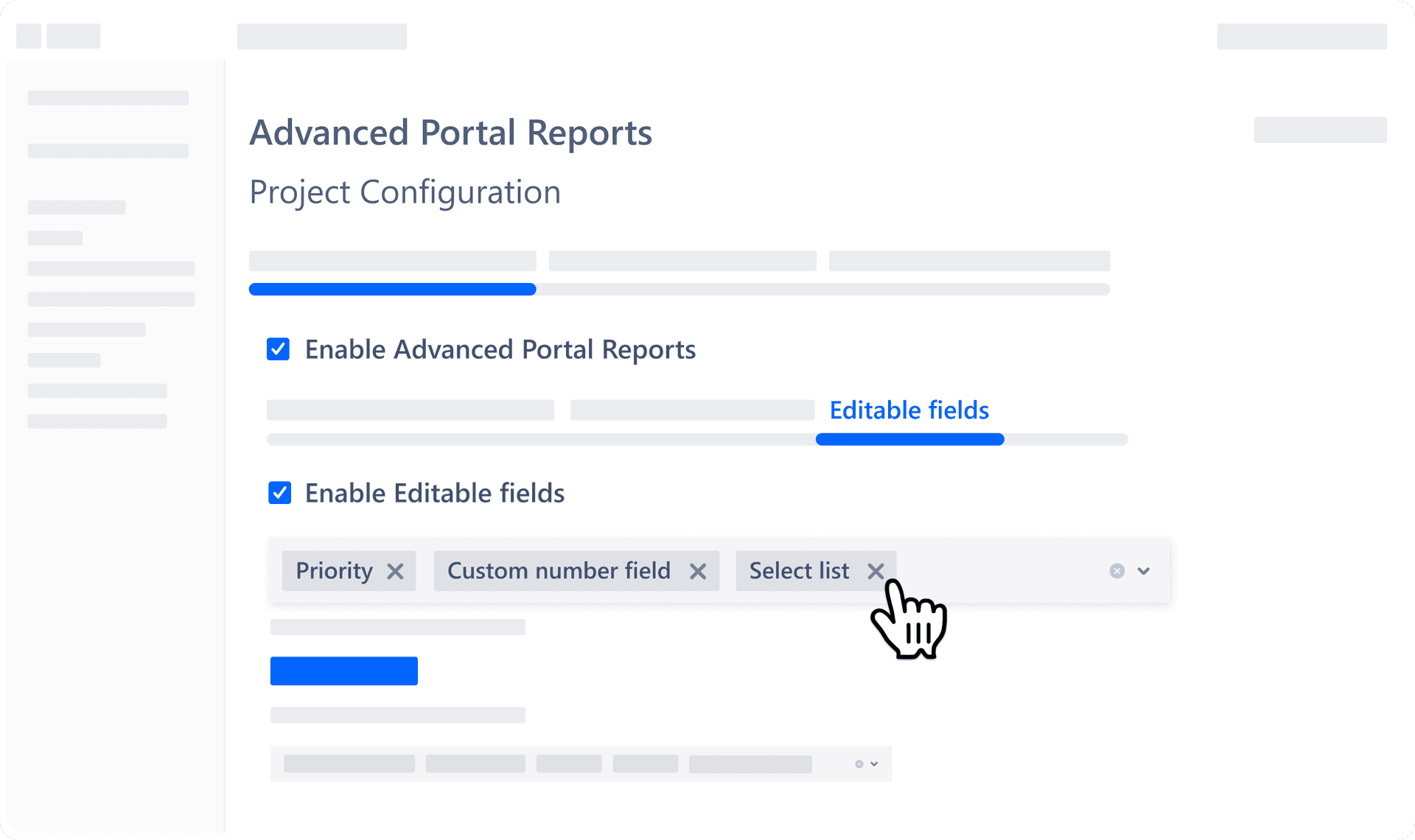
Admins decide who can edit which fields, and every change is logged (who, what, and when), exportable for compliance and visible to agents as internal comments. A dedicated Customer Success team helps you roll it out, with direct input into what we build next.

Service teams love Advanced Portal Reports
Success stories from our partner network
Compare editions
Overview of what's included in each edition
Advanced Report
Searchable, filterable, sortable report of JSM requests in the portal. Customize column selection and ordering.

Full text search
Search across any text fields, summary, comments, key and reporter at once. Enter an issue key to jump straight to a specific request.
Exporting
Export matching records to CSV or Excel, respecting filters and columns.
Saved & Global Views
Save filters, columns, sort, and search as a reusable view. Admins can publish shared Global Views across the project and share via direct link.
Charts
Track request volume and SLA performance over time. Two charts: Created vs Resolved and SLA Met vs Breached. Export chart data to Excel.
Additional fields in portal ticket
Show additional fields in the request view: custom fields, assets, and live SLA metrics on the individual request.
Everything in the Standard Plan
Controlled field editing
Portal users can edit number, single-select, priority, and date fields from the report. No Jira license needed. Admins control who can edit which fields.
Edit history & audit trail
Full log of every edit: who, what, when. Exportable for compliance by admins. Visible to agents as internal comments.
Customer Success
Dedicated CS & Experts will guide you in adopting Advanced capabilities in your workflows. Give direct input into future product development.
Advanced Report
Searchable, filterable, sortable report of JSM requests in the portal. Customize column selection and ordering.
Full text search
Search across any text fields, summary, comments, key and reporter at once. Enter an issue key to jump straight to a specific request.
Exporting
Export matching records to CSV or Excel, respecting filters and columns.
Saved & Global Views
Save filters, columns, sort, and search as a reusable view. Admins can publish shared Global Views across the project and share via direct link.
Charts
Track request volume and SLA performance over time. Two charts: Created vs Resolved and SLA Met vs Breached. Export chart data to Excel.
Additional fields in portal ticket
Show additional fields in the request view: custom fields, assets, and live SLA metrics on the individual request.
Controlled field editing
Portal users can edit number, single-select, priority, and date fields from the report. No Jira license needed. Admins control who can edit which fields.
Edit history & audit trail
Full log of every edit: who, what, when. Exportable for compliance by admins. Visible to agents as internal comments.
Customer Success
Dedicated CS & Experts will guide you in adopting Advanced capabilities in your workflows. Give direct input into future product development.
Frequently asked questions
Answers to the questions we hear most often
Do portal customers or business stakeholders need a paid Jira license?

No. Everything portal customers and business stakeholders can do in Advanced Portal Reports, including prioritizing requests in Advanced Edition, happens inside the JSM portal they already have access to. No additional Jira license is required for either edition.
How is this different from the native JSM portal?
The native JSM portal only shows customers a basic view of their own individual requests. Advanced Portal Reports adds the Advanced Report to the portal: customers can search, filter, and export requests, and see SLA and custom field context across everything in one place. In Advanced Edition, they can prioritize requests directly there too.
What's the difference between Standard and Advanced Edition?
Standard Edition gives portal customers full self-service visibility through the Advanced Report on its own: search, filter, and export requests, save Saved Views or use admin-published Global Views, track request volume and SLA performance with built-in charts, and see full context including custom fields. Advanced Edition builds on that same Advanced Report by adding controlled editing of priority, custom number, and single-select fields, along with a full audit trail and dedicated Customer Success guidance.
Can users save their own report views?
Yes. Individual users can save their filters, columns, and search queries as Saved Views, so they don't need to set them up again each time they return to the portal.
Can admins create a predefined report view for their customers?
Yes. Admins can publish Global Views across the project, so portal customers see the same pre-configured filters and columns automatically, with no setup needed on their end. Global Views can also be shared with a direct link.
Can I switch from Standard to Advanced Edition later?
Yes. You can start a free trial of either edition and change your edition at any time, during or after the trial.
Which fields can portal users edit in the report?
In Advanced Edition, authorized portal users can update priority, number, single-select, and date picker field types directly in the Advanced Report, letting business stakeholders align on priorities before planning begins, with no spreadsheets, disconnected tools, or email chains needed.
How do admins control who can edit fields?
Admins manage this from the Editable Fields tab in the Advanced Portal Reports project configuration. From there, they control:
- Which fields are editable: priority, number, and single-select fields, chosen from the fields already visible in the Advanced Report
- Which request types allow editing: customers can only edit fields on the request types an admin selects
- Which statuses allow editing: editing can be limited to specific stages of a request's lifecycle
- Who can edit: all users, or specific users, groups, or organizations chosen by the admin
Editing access never grants customers visibility into requests they couldn't already see, and every change is recorded in an exportable audit log.
Is the app secure and enterprise-ready?
Yes. Advanced Portal Reports is built to satisfy strict IT and security requirements:
- Runs on Atlassian (No Data Egress): Built 100% on Atlassian Forge. Your data never leaves Atlassian's servers or travels to third-party databases, ensuring native compliance and data residency matching your Jira instance.
- Cloud Fortified Badge: Meets Atlassian's highest standard for enterprise cloud apps, including automated security testing, participation in the Security Bug Bounty program, high reliability standards, and guaranteed 24-hour response SLAs.
- Standard Legal Agreement: uses Atlassian's standard legal agreement to simplify the customer procurement process.
- Partner Supported & Migration Ready: Direct support from Atlassian Partners and fully compatible with the Atlassian Cloud Migration Assistant.
- Battle-Tested: Trusted and active on 1,400+ Jira Cloud instances.

Ready to give your portal
customers
more visibility
and control?
Try Advanced Portal Reports for free in
either Standard or Advanced Edition, or
book a 20-minute demo to see it in action.